Analysis3 dask_jobqueue storage flags query

I’m starting to use analysis3 with ARE for my workflows, but a lot of the data I want to analyse are on w42, a CLEX legacy project on NCI. When I add gdata/w42 to the storage flag in dask_jobqueue.PBSCluster, the dask worker job silently quits after being queued for a short time (viewed with qstat -u <user>). Here is the code:

from dask.distributed import Client,LocalCluster
from dask_jobqueue import PBSCluster

walltime = "00:05:00"
cores = 1
memory = str(4 * cores) + "GB"

cluster = PBSCluster(
    walltime=str(walltime),
    cores=cores,
    memory=str(memory),
    processes=cores,
    job_extra_directives=[
        "-q normal",
        "-P dt6",
        "-l ncpus="+str(cores),
        "-l mem="+str(memory),
        "-l storage=gdata/xp65+gdata/w42"
    ],
    local_directory="$TMPDIR",
    job_directives_skip=["select"],
    python="/g/data/xp65/public/apps/med_conda_scripts/analysis3-25.08.d/bin/python",
    job_script_prologue=['module load conda/analysis3-25.08'],
)
cluster.scale(jobs=1)
client = Client(cluster)
print(client)

It seems to work if only xp65 or e.g. rt52 are included in the storage flag.

Is it not possible to use w42 with analysis3? How can one find out which projects can or cannot be used with analysis3?

1 Like

Have you added gdata/w42 to the list of projects the ARE job needs to access when you started it?

See:

Thanks @Aidan . Yes, gdata/42 is listed there.

Sorry, that was maybe a red herring, as you’re doing a separate PBS submission for your desk worker, but I thought it was worth checking.

Have you looked for the PBS job stdout and stderr logs to see if they have any useful information?

Can you access the contents of /g/data/w42 from a terminal when logged into gadi? What about from your ARE session? I recall not all /g/data mounts used to be exported for use with the VDI infrastructure, but I don’t know if that is the case with ARE.

As this seems to work if you don’t include w42 that suggests it isn’t an issue with the ACCESS-NRI conda environment. In which case if the logs don’t have anything useful I think you’re probably best to email help@nci.org.au as they have access to system logs and other information.

Thanks again @Aidan. These are the logs I can find by specifying log_directory in PBSCluster:

Output of 150078909.gadi-pbs.ER:

ERROR: Unable to locate a modulefile for ‘conda/analysis3-25.08’/g/data/xp65/public/apps/med_conda_scripts/analysis3-25.08.d/bin/python: line 121: /g/data/w42/dr6273/apps/conda/bin/conda/envs/analysis3-25.08/bin/python: Not a directory/g/data/xp65/public/apps/med_conda_scripts/analysis3-25.08.d/bin/python: line 121: exec: /g/data/w42/dr6273/apps/conda/bin/conda/envs/analysis3-25.08/bin/python: cannot execute: Not a directory

Output of 150078909.gadi-pbs.OU:

======================================================================================
                  Resource Usage on 2025-09-19 17:49:43:
   Job Id:             150078909.gadi-pbs
   Project:            dt6
   Exit Status:        126
   Service Units:      0.00
   NCPUs Requested:    1                      NCPUs Used: 1
                                           CPU Time Used: 00:00:01
   Memory Requested:   4.0GB                 Memory Used: 107.12MB
   Walltime requested: 00:05:00            Walltime Used: 00:00:05
   JobFS requested:    100.0MB                JobFS used: 0B
======================================================================================

The first one implies it’s looking for analysis3 in w42 as well as xp65?

As a comparison, when running this with only xp65, the error log (once I shutdown the cluster manually), still has a module file error:

ERROR: Unable to locate a modulefile for 'conda/analysis3-25.08'
2025-09-19 18:09:52,820 - distributed.nanny - INFO -         Start Nanny at: 'tcp://10.6.59.27:45255'
2025-09-19 18:09:53,912 - distributed.worker - INFO -       Start worker at:     tcp://10.6.59.27:44195
2025-09-19 18:09:53,912 - distributed.worker - INFO -          Listening to:     tcp://10.6.59.27:44195
2025-09-19 18:09:53,912 - distributed.worker - INFO -           Worker name:               PBSCluster-0
2025-09-19 18:09:53,912 - distributed.worker - INFO -          dashboard at:           10.6.59.27:33933
2025-09-19 18:09:53,912 - distributed.worker - INFO - Waiting to connect to:     tcp://10.6.121.1:34899
2025-09-19 18:09:53,912 - distributed.worker - INFO - -------------------------------------------------
2025-09-19 18:09:53,912 - distributed.worker - INFO -               Threads:                          1
2025-09-19 18:09:53,912 - distributed.worker - INFO -                Memory:                   3.73 GiB
2025-09-19 18:09:53,912 - distributed.worker - INFO -       Local Directory: /jobfs/150081310.gadi-pbs/dask-scratch-space/worker-mkmth9vd
2025-09-19 18:09:53,912 - distributed.worker - INFO - -------------------------------------------------
2025-09-19 18:09:53,925 - distributed.worker - INFO - Starting Worker plugin shuffle
2025-09-19 18:09:53,926 - distributed.worker - INFO -         Registered to:     tcp://10.6.121.1:34899
2025-09-19 18:09:53,926 - distributed.worker - INFO - -------------------------------------------------
2025-09-19 18:09:53,926 - distributed.core - INFO - Starting established connection to tcp://10.6.121.1:34899
2025-09-19 18:11:52,370 - distributed._signals - INFO - Received signal SIGTERM (15)
/g/data/xp65/public/apps/med_conda/envs/analysis3-25.08/lib/python3.11/multiprocessing/resource_tracker.py:254: UserWarning: resource_tracker: There appear to be 6 leaked semaphore objects to clean up at shutdown
  warnings.warn('resource_tracker: There appear to be %d '

Yes I can access w42 from within gadi. To be clear, I have been using my own Conda environments with ARE and w42 for years. This is just an issue since switching to xp65 and analysis3.

If the above still points to an NCI issue I will email them next week.

Thanks for looking into that. Those logs do look strange. I’ll add a help tag and let the triage team pick it up on Monday and they can find someone to assist, as it does look like something odd is happening.

1 Like

@dougrichardson am I correctly understanding that you’re spinning up the PBSCluster from within an ARE instance?

If so, can you try a couple of things just to see what happens:

  1. Try to launch the script you provided in your initial post from a login node
  2. Change the script to the following from within the ARE session:
from dask.distributed import Client,LocalCluster
from dask_jobqueue import PBSCluster
import sys

walltime = "00:05:00"
cores = 1
memory = str(4 * cores) + "GB"

cluster = PBSCluster(
    walltime=str(walltime),
    cores=cores,
    memory=str(memory),
    processes=cores,
    job_extra_directives=[
        "-q normal",
        "-P dt6",
        "-l ncpus="+str(cores),
        "-l mem="+str(memory),
        "-l storage=gdata/xp65+gdata/w42"
    ],
    local_directory="$TMPDIR",
    job_directives_skip=["select"],
    #python="/g/data/xp65/public/apps/med_conda_scripts/analysis3-25.08.d/bin/python",
    #job_script_prologue=['module load conda/analysis3-25.08'],)
cluster.scale(jobs=1)
client = Client(cluster)
print(client)
  1. Try a combo of both - ie. running the script above from a login node with the conda/analysis3 loaded. The xp65 environment variables should configure it for you (I can’t spot anything, but maybe there’s a typo in there?

A while back, we set the environment variables to handle this by default - I wonder if the added configuration is causing conflict. See also forum post and git issue.

I have a mild suspicion that for containerisation reasons, the additional config is confusing things - but I’m not entirely sure why yet. I thiiiink that if at least one of my suggestions above doesn’t work, they should give us different error & point us to the source of the issue.

My suspicion is that one of those two directives is messing up the python path somehow and it’s sending dask looking for a python executable in the wrong place (N.B I’ve split this error up into lines):

ERROR: Unable to locate a modulefile for ‘conda/analysis3-25.08’/g/data/xp65/public/apps/med_conda_scripts/analysis3-25.08.d/bin/python: 
line 121: /g/data/w42/dr6273/apps/conda/bin/conda/envs/analysis3-25.08/bin/python: Not a directory/g/data/xp65/public/apps/med_conda_scripts/analysis3-25.08.d/bin/python: 
line 121: exec: /g/data/w42/dr6273/apps/conda/bin/conda/envs/analysis3-25.08/bin/python: cannot execute: Not a directory

If you read the subsequent lines, it looks like paths have gotten mangled together.

Thanks @CharlesTurner .

Correct.

Done. The dask worker sits in the queue, runs for a second or two and then quits. Error log:

ERROR: Unable to locate a modulefile for 'conda/analysis3-25.08' /g/data/xp65/public/apps/med_conda_scripts/analysis3-25.08.d/bin/python: line 121: /g/data/w42/dr6273/apps/conda/bin/conda/envs/analysis3-25.08/bin/python: Not a directory
/g/data/xp65/public/apps/med_conda_scripts/analysis3-25.08.d/bin/python: line 121: exec: /g/data/w42/dr6273/apps/conda/bin/conda/envs/analysis3-25.08/bin/python: cannot execute: Not a directory

Same result, slightly different error log (note I added a log_directory path so I can see logs). Before I created this post I didn’t have python or job_script_prologue specified. My attempt to debug led me to the forum post you linked to, plus this one. Error log:

/g/data/xp65/public/apps/med_conda_scripts/analysis3-25.08.d/bin/python: line 121: /g/data/w42/dr6273/apps/conda/bin/conda/envs/analysis3-25.08/bin/python: Not a directory
/g/data/xp65/public/apps/med_conda_scripts/analysis3-25.08.d/bin/python: line 121: exec: /g/data/w42/dr6273/apps/conda/bin/conda/envs/analysis3-25.08/bin/python: cannot execute: Not a directory

Same problem (and same error log as #2)… Just in case I’m doing it wrong form the login node, this is what I do: I log in to Gadi, use module load to load analysis3, run python3 and then the script above.

1 Like

Okay, that’s not what I would have expected - I was hoping one of those was going to turf up a more useful error message.

I’ve requested to join w42 and when I get access I’ll dig into this in detail - from your description, there’s nothing I can see that’s an obvious problem.

I’ll get back to you as soon as I get access.

2 Likes

Hi Doug,

I’ve just spun up a PBSCluster with w42 in my modules without any issue, which is probably unhelpful. N.B I didn’t try loading any data in w42 - didn’t know where to look so I just loaded some in cj50 with my PBSCluster - but if you have some data in w42 I’ll try with a super stripped down version that just uses those projects.

The only real differences I’m spotting are:

  1. I’m explicitly loading openmpi as well as conda/analysis3 - potentially this might be a source of issues. Can you try loading that? I could imagine that this could cause communication issues - I’m not entirely convinced it is the source of the error though.
  2. I’m not setting --notebook-dir. I’d be surprised if that’s the source of issues, but if the previous step doesn’t work there’s no harm in trying that.

If neither of those work, we’ll need to go down the rabbit hole…

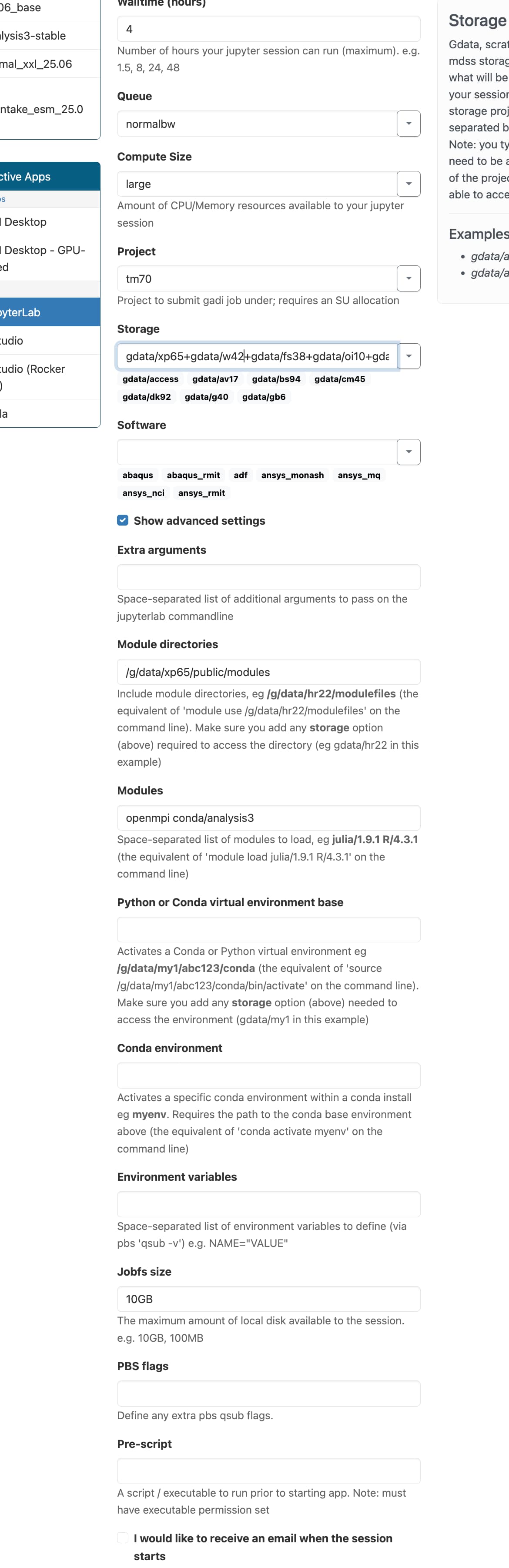
Thanks for persisting with this @CharlesTurner. I am so confused as to why it is working for you! Neither of your suggestions worked. Just to recap, here are my settings:

And code:

from dask.distributed import Client,LocalCluster
from dask_jobqueue import PBSCluster
import sys

walltime = "00:05:00"
cores = 1
memory = str(4 * cores) + "GB"

cluster = PBSCluster(
    walltime=str(walltime),
    cores=cores,
    memory=str(memory),
    processes=cores,
    job_extra_directives=[
        "-q normal",
        "-P dt6",
        "-l ncpus="+str(cores),
        "-l mem="+str(memory),
        "-l storage=gdata/xp65+gdata/w42"
    ],
    local_directory="$TMPDIR",
    job_directives_skip=["select"],
)
cluster.scale(jobs=1)
client = Client(cluster)
client

This is using the analysis3-25.08kernel.

I have no idea if this is relevant, but sys.pathgives me:

['/home/599/dr6273',
 '/g/data/w42/dr6273/work/xbootstrap',
 '/g/data/w42/dr6273/work/xeof',
 '/home/599/dr6273/ondemand/data/sys/dashboard/batch_connect/sys/jupyter/ncigadi/output/7e80a715-60e7-4520-8bbc-d610adb44c05/lib/python3',
 '/g/data/xp65/public/apps/med_conda/envs/analysis3-25.08/lib/python311.zip',
 '/g/data/xp65/public/apps/med_conda/envs/analysis3-25.08/lib/python3.11',
 '/g/data/xp65/public/apps/med_conda/envs/analysis3-25.08/lib/python3.11/lib-dynload',
 '',
 '/home/599/dr6273/.local/lib/python3.11/site-packages',
 '/g/data/xp65/public/apps/med_conda/envs/analysis3-25.08/lib/python3.11/site-packages']

and in a gadi terminal, if I look at PATH I get:

(base) [dr6273@gadi-login-08 ~]$ echo $PATH
/g/data/xp65/public/apps/nci_scripts:/g/data/xp65/public/apps/med_conda_scripts/analysis3-25.08.d/bin:/g/data/w42/dr6273/apps/conda/bin:/g/data/w42/dr6273/apps/conda/condabin:/home/599/dr6273/.local/bin:/home/599/dr6273/bin/python3.12:/opt/pbs/default/bin:/opt/nci/bin:/opt/bin:/opt/Modules/v4.3.0/bin:/bin:/usr/bin:/usr/local/sbin:/usr/sbin:/opt/pbs/default/bin:/opt/singularity/bin

If troubleshooting this is too niche, I could change my workflow to gradually move away from w42 completely.

This line is a potential source of issues - it’s basically saying that you have packages installed into your .local, which could be a source of conflicts and version mismatches.

Can you try deleting it (ie. rm -fr ~/.local/lib/python3.11/site-packages) or moving it elsewhere (eg. mv ~/.local/lib/python3.11/site-packages ~/.local/lib/python3.15/site-packages will move it to only be picked up by the not yet real python3.15 interpreter without deleting it).

Failing that, we can also start looking at your dask config:

import dask
print(dask.config.config)

Moving that directory has changed something. Now, according to qstat the cluster is running:

150687455.gadi-pbs dr6273 normal-* dask-work* 19772* 1 1 4096m 00:05 R 00:03

But in jupyter there is nothing:

sys.path has a new line:

['/jobfs/150687205.gadi-pbs/dask-scratch-space/scheduler-eszpym4_',
 '/home/599/dr6273',
 '/g/data/w42/dr6273/work/xbootstrap',
 '/g/data/w42/dr6273/work/xeof',
 '/home/599/dr6273/ondemand/data/sys/dashboard/batch_connect/sys/jupyter/ncigadi/output/adfc5c51-185b-4195-9f3d-8766238bd90a/lib/python3',
 '/g/data/xp65/public/apps/med_conda/envs/analysis3-25.08/lib/python311.zip',
 '/g/data/xp65/public/apps/med_conda/envs/analysis3-25.08/lib/python3.11',
 '/g/data/xp65/public/apps/med_conda/envs/analysis3-25.08/lib/python3.11/lib-dynload',
 '',
 '/g/data/xp65/public/apps/med_conda/envs/analysis3-25.08/lib/python3.11/site-packages']

Here is the output of dask.config.config

{'jobqueue': {'pbs': {'local-directory': '$TMPDIR', 'log-directory': '/g/data/w42/dr6273/tmp/logs', 'python': '/g/data/xp65/public/apps/med_conda_scripts/analysis3-25.08.d/bin/python', 'name': 'dask-worker', 'cores': None, 'memory': None, 'processes': None, 'interface': None, 'death-timeout': 60, 'shared-temp-directory': None, 'extra': None, 'worker-command': 'distributed.cli.dask_worker', 'worker-extra-args': [], 'shebang': '#!/usr/bin/env bash', 'queue': None, 'account': None, 'walltime': '00:30:00', 'env-extra': None, 'job-script-prologue': [], 'resource-spec': None, 'job-extra': None, 'job-extra-directives': [], 'job-directives-skip': [], 'scheduler-options': {}}, 'oar': {'name': 'dask-worker', 'cores': None, 'memory': None, 'processes': None, 'python': None, 'interface': None, 'death-timeout': 60, 'local-directory': None, 'shared-temp-directory': None, 'extra': None, 'worker-command': 'distributed.cli.dask_worker', 'worker-extra-args': [], 'shebang': '#!/usr/bin/env bash', 'queue': None, 'project': None, 'walltime': '00:30:00', 'env-extra': None, 'job-script-prologue': [], 'resource-spec': None, 'job-extra': None, 'job-extra-directives': [], 'job-directives-skip': [], 'log-directory': None, 'memory-per-core-property-name': None, 'scheduler-options': {}}, 'sge': {'name': 'dask-worker', 'cores': None, 'memory': None, 'processes': None, 'python': None, 'interface': None, 'death-timeout': 60, 'local-directory': None, 'shared-temp-directory': None, 'extra': None, 'worker-command': 'distributed.cli.dask_worker', 'worker-extra-args': [], 'shebang': '#!/usr/bin/env bash', 'queue': None, 'project': None, 'walltime': '00:30:00', 'env-extra': None, 'job-script-prologue': [], 'job-extra': None, 'job-extra-directives': [], 'job-directives-skip': [], 'log-directory': None, 'resource-spec': None, 'scheduler-options': {}}, 'slurm': {'name': 'dask-worker', 'cores': None, 'memory': None, 'processes': None, 'python': None, 'interface': None, 'death-timeout': 60, 'local-directory': None, 'shared-temp-directory': None, 'extra': None, 'worker-command': 'distributed.cli.dask_worker', 'worker-extra-args': [], 'shebang': '#!/usr/bin/env bash', 'queue': None, 'account': None, 'walltime': '00:30:00', 'env-extra': None, 'job-script-prologue': [], 'job-cpu': None, 'job-mem': None, 'job-extra': None, 'job-extra-directives': [], 'job-directives-skip': [], 'log-directory': None, 'scheduler-options': {}}, 'moab': {'name': 'dask-worker', 'cores': None, 'memory': None, 'processes': None, 'python': None, 'interface': None, 'death-timeout': 60, 'local-directory': None, 'shared-temp-directory': None, 'extra': None, 'worker-command': 'distributed.cli.dask_worker', 'worker-extra-args': [], 'shebang': '#!/usr/bin/env bash', 'queue': None, 'account': None, 'walltime': '00:30:00', 'env-extra': None, 'job-script-prologue': [], 'resource-spec': None, 'job-extra': None, 'job-extra-directives': [], 'job-directives-skip': [], 'log-directory': None, 'scheduler-options': {}}, 'lsf': {'name': 'dask-worker', 'cores': None, 'memory': None, 'processes': None, 'python': None, 'interface': None, 'death-timeout': 60, 'local-directory': None, 'shared-temp-directory': None, 'extra': None, 'worker-command': 'distributed.cli.dask_worker', 'worker-extra-args': [], 'shebang': '#!/usr/bin/env bash', 'queue': None, 'project': None, 'walltime': '00:30', 'env-extra': None, 'job-script-prologue': [], 'ncpus': None, 'mem': None, 'job-extra': None, 'job-extra-directives': [], 'job-directives-skip': [], 'log-directory': None, 'lsf-units': None, 'use-stdin': True, 'scheduler-options': {}}, 'htcondor': {'name': 'dask-worker', 'cores': None, 'memory': None, 'processes': None, 'python': None, 'interface': None, 'death-timeout': 60, 'local-directory': None, 'shared-temp-directory': None, 'extra': None, 'worker-command': 'distributed.cli.dask_worker', 'worker-extra-args': [], 'disk': None, 'env-extra': None, 'job-script-prologue': [], 'job-extra': None, 'job-extra-directives': {}, 'job-directives-skip': [], 'submit-command-extra': [], 'cancel-command-extra': [], 'log-directory': None, 'shebang': '#!/usr/bin/env condor_submit', 'scheduler-options': {}}, 'local': {'name': 'dask-worker', 'cores': None, 'memory': None, 'processes': None, 'python': None, 'interface': None, 'death-timeout': 60, 'local-directory': None, 'shared-temp-directory': None, 'extra': None, 'worker-command': 'distributed.cli.dask_worker', 'worker-extra-args': [], 'env-extra': None, 'job-script-prologue': [], 'job-extra': None, 'job-extra-directives': [], 'job-directives-skip': [], 'log-directory': None, 'scheduler-options': {}}}, 'distributed': {'dashboard': {'link': '/proxy/{port}/status', 'export-tool': False, 'graph-max-items': 5000, 'prometheus': {'namespace': 'dask'}}, 'version': 2, 'scheduler': {'allowed-failures': 3, 'bandwidth': 100000000, 'blocked-handlers': [], 'contact-address': None, 'default-data-size': '1kiB', 'events-cleanup-delay': '1h', 'idle-timeout': None, 'no-workers-timeout': None, 'work-stealing': True, 'work-stealing-interval': '1s', 'worker-saturation': 1.1, 'rootish-taskgroup': 5, 'rootish-taskgroup-dependencies': 5, 'worker-ttl': '5 minutes', 'preload': [], 'preload-argv': [], 'unknown-task-duration': '500ms', 'default-task-durations': {'rechunk-split': '1us', 'split-shuffle': '1us', 'split-taskshuffle': '1us', 'split-stage': '1us'}, 'validate': False, 'dashboard': {'status': {'task-stream-length': 1000}, 'tasks': {'task-stream-length': 100000}, 'tls': {'ca-file': None, 'key': None, 'cert': None}, 'bokeh-application': {'allow_websocket_origin': ['*'], 'keep_alive_milliseconds': 500, 'check_unused_sessions_milliseconds': 500}}, 'locks': {'lease-validation-interval': '10s', 'lease-timeout': '30s'}, 'http': {'routes': ['distributed.http.scheduler.prometheus', 'distributed.http.scheduler.info', 'distributed.http.scheduler.json', 'distributed.http.health', 'distributed.http.proxy', 'distributed.http.statics']}, 'allowed-imports': ['dask', 'distributed'], 'active-memory-manager': {'start': True, 'interval': '2s', 'measure': 'optimistic', 'policies': [{'class': 'distributed.active_memory_manager.ReduceReplicas'}]}}, 'worker': {'blocked-handlers': [], 'multiprocessing-method': 'spawn', 'use-file-locking': True, 'transfer': {'message-bytes-limit': '50MB'}, 'connections': {'outgoing': 50, 'incoming': 10}, 'preload': [], 'preload-argv': [], 'daemon': True, 'validate': False, 'resources': {}, 'lifetime': {'duration': None, 'stagger': '0 seconds', 'restart': False}, 'profile': {'enabled': True, 'interval': '10ms', 'cycle': '1000ms', 'low-level': False}, 'memory': {'recent-to-old-time': '30s', 'rebalance': {'measure': 'optimistic', 'sender-min': 0.3, 'recipient-max': 0.6, 'sender-recipient-gap': 0.1}, 'transfer': 0.1, 'target': 0.6, 'spill': 0.7, 'pause': 0.8, 'terminate': 0.95, 'max-spill': False, 'spill-compression': 'auto', 'monitor-interval': '100ms'}, 'http': {'routes': ['distributed.http.worker.prometheus', 'distributed.http.health', 'distributed.http.statics']}}, 'nanny': {'preload': [], 'preload-argv': [], 'environ': {}, 'pre-spawn-environ': {'MALLOC_TRIM_THRESHOLD_': 65536, 'OMP_NUM_THREADS': 1, 'MKL_NUM_THREADS': 1, 'OPENBLAS_NUM_THREADS': 1}}, 'client': {'heartbeat': '5s', 'scheduler-info-interval': '2s', 'security-loader': None, 'preload': [], 'preload-argv': []}, 'deploy': {'lost-worker-timeout': '15s', 'cluster-repr-interval': '500ms'}, 'adaptive': {'interval': '1s', 'target-duration': '5s', 'minimum': 0, 'maximum': inf, 'wait-count': 3}, 'comm': {'retry': {'count': 0, 'delay': {'min': '1s', 'max': '20s'}}, 'compression': False, 'shard': '64MiB', 'offload': '10MiB', 'default-scheme': 'tcp', 'socket-backlog': 2048, 'ucx': {'cuda-copy': None, 'tcp': None, 'nvlink': None, 'infiniband': None, 'rdmacm': None, 'create-cuda-context': None, 'environment': {}}, 'zstd': {'level': 3, 'threads': 0}, 'timeouts': {'connect': '30s', 'tcp': '30s'}, 'require-encryption': None, 'tls': {'ciphers': None, 'min-version': 1.2, 'max-version': None, 'ca-file': None, 'scheduler': {'cert': None, 'key': None}, 'worker': {'key': None, 'cert': None}, 'client': {'key': None, 'cert': None}}, 'websockets': {'shard': '8MiB'}}, 'diagnostics': {'nvml': True, 'cudf': False, 'computations': {'max-history': 100, 'nframes': 0, 'ignore-modules': ['asyncio', 'functools', 'threading', 'datashader', 'dask', 'debugpy', 'distributed', 'ipykernel', 'coiled', 'cudf', 'cuml', 'matplotlib', 'pluggy', 'prefect', 'rechunker', 'xarray', 'xgboost', 'xdist', '__channelexec__', 'execnet'], 'ignore-files': ['runpy\\.py', 'pytest', 'py\\.test', 'pytest-script\\.py', '_pytest', 'pycharm', 'vscode_pytest', 'get_output_via_markers\\.py']}, 'erred-tasks': {'max-history': 100}}, 'p2p': {'comm': {'buffer': '1 GiB', 'concurrency': 10, 'message-bytes-limit': '2 MiB', 'retry': {'count': 10, 'delay': {'min': '1s', 'max': '30s'}}}, 'storage': {'buffer': '100 MiB', 'disk': True}, 'threads': None}, 'admin': {'large-graph-warning-threshold': '10MB', 'tick': {'interval': '20ms', 'limit': '3s', 'cycle': '1s'}, 'max-error-length': 10000, 'log-length': 10000, 'log-format': '%(asctime)s - %(name)s - %(levelname)s - %(message)s', 'low-level-log-length': 1000, 'pdb-on-err': False, 'system-monitor': {'interval': '500ms', 'log-length': 7200, 'disk': True, 'host-cpu': False, 'gil': {'enabled': True, 'interval': '1ms'}}, 'event-loop': 'tornado'}, 'rmm': {'pool-size': None}}, 'temporary_directory': '/jobfs/150687205.gadi-pbs', 'visualization': {'engine': None}, 'tokenize': {'ensure-deterministic': False}, 'dataframe': {'backend': 'pandas', 'shuffle': {'method': None, 'compression': None}, 'parquet': {'metadata-task-size-local': 512, 'metadata-task-size-remote': 1, 'minimum-partition-size': 75000000}, 'convert-string': None, 'query-planning': None}, 'array': {'backend': 'numpy', 'chunk-size': '128MiB', 'chunk-size-tolerance': 1.25, 'rechunk': {'method': None, 'threshold': 4}, 'svg': {'size': 120}, 'slicing': {'split-large-chunks': None}, 'query-planning': None}, 'optimization': {'annotations': {'fuse': True}, 'fuse': {'active': None, 'ave-width': 1, 'max-width': None, 'max-height': inf, 'max-depth-new-edges': None, 'rename-keys': True, 'delayed': False}}, 'admin': {'async-client-fallback': None, 'traceback': {'shorten': ['concurrent[\\\\\\/]futures[\\\\\\/]', 'dask[\\\\\\/](base|core|local|multiprocessing|optimization|threaded|utils)\\.py', 'dask[\\\\\\/]array[\\\\\\/]core\\.py', 'dask[\\\\\\/]dataframe[\\\\\\/](core|methods)\\.py', 'dask[\\\\\\/]_task_spec\\.py', 'distributed[\\\\\\/](client|scheduler|utils|worker)\\.py', 'tornado[\\\\\\/]gen\\.py', 'pandas[\\\\\\/]core[\\\\\\/]']}}, 'scheduler': 'dask.distributed'}

The PBSCluster can take a while to spin up - I’d expect it to look like that for maybe a couple of minutes whilst the associated job is in the queue.

Mine took probably a minute & looked like that until the associated job started. I’m assuming you killed the notebook kernel because it looks broken - I’ve definitely done that far too many times. Assuming I’m right, are you able to leave it a few minutes & then come back to it to see if it’s attached correctly.

Other than that, I can’t see anything obviously wrong with your dask config. If it isn’t just that the PBSCluster takes a while to spin up/attach, can you post the logs out of /g/data/w42/dr6273/tmp/logs and we’ll see if we can find anything suspicious.

I can do that (wait longer), but in all the previous cases, the cluster status Sfrom qstatwould be Q while it is queued, switch to R briefly, then E briefly, and then quit. Now it stays as R, but does not register in jupyter. For a working example (i.e., without w42), qstat shows Rin the same way, but also registers in jupyter.

Ok, weirdly I can’t replicate the ‘new’ issue of a running cluster not attaching in the notebook. Back to the old issue of the cluster silently quitting.

Here are the logs (added line breaks):

/g/data/xp65/public/apps/med_conda_scripts/analysis3-25.08.d/bin/python:
line 121: /g/data/w42/dr6273/apps/conda/bin/conda/envs/analysis3-25.08/bin/python: Not a directory
/g/data/xp65/public/apps/med_conda_scripts/analysis3-25.08.d/bin/python:
line 121: exec: /g/data/w42/dr6273/apps/conda/bin/conda/envs/analysis3-25.08/bin/python: cannot execute: Not a directory

and

======================================================================================
                  Resource Usage on 2025-09-24 15:24:15:
   Job Id:             150692424.gadi-pbs
   Project:            dt6
   Exit Status:        126
   Service Units:      0.03
   NCPUs Requested:    1                      NCPUs Used: 1
                                           CPU Time Used: 00:00:02
   Memory Requested:   4.0GB                 Memory Used: 106.82MB
   Walltime requested: 00:05:00            Walltime Used: 00:00:53
   JobFS requested:    100.0MB                JobFS used: 0B
======================================================================================

Very weird - other than the module file issue, that looks like the exact same error is being produced.

Can you confirm for me that nothing’s gotten reinstalled into your .local in the process?

I wonder if you have something in your w42 area which is causing issues - a script that automatically downloads some extra dependencies, or something like that. Anything like !pip install xyz in the notebook could also be the source of this.

/home/599/dr6273/.local/lib/python3.11/ remains empty. No !pip command in the notebook either.

Yes, it must be something I have set up in w42. I just do not understand why it only applies to PBScluster- I can read data from there. A workaround for now could just be to stop using PBScluster and instead spin up short, high memory ARE instances for heavy lifting when I need it.

My .bashrc looks like this. There is a module load pbscommand in the second if statement.

# .bashrc

# Source global definitions (Required for modules)
if [ -f /etc/bashrc ]; then
        . /etc/bashrc
fi

if in_interactive_shell; then
    # This is where you put settings that you'd like in
    # interactive shells. E.g. prompts, or aliases
    # The 'module' command offers path manipulation that
    # will only modify the path if the entry to be added
    # is not already present. Use these functions instead of e.g.
    # PATH=${HOME}/bin:$PATH

    prepend_path PATH ${HOME}/bin/python3.12
    prepend_path PATH ${HOME}/.local/bin

    if in_login_shell; then
        # This is where you place things that should only
        # run when you login. If you'd like to run a
        # command that displays the status of something, or
        # load a module, or change directory, this is the
        # place to put it
        module load pbs
        # cd /scratch/${PROJECT}/${USER}
    fi

fi

# Anything here will run whenever a new shell is launched, which
# includes when running commands like 'less'. Commands that
# produce output should not be placed in this section.
#
# If you need different behaviour depending on what machine you're
# using to connect to Gadi, you can use the following test:
#
# if [[ $SSH_CLIENT =~ 11.22.33.44 ]]; then
# .bashrc

# Source global definitions (Required for modules)
if [ -f /etc/bashrc ]; then
        . /etc/bashrc
fi

if in_interactive_shell; then
    # This is where you put settings that you'd like in
    # interactive shells. E.g. prompts, or aliases
    # The 'module' command offers path manipulation that
    # will only modify the path if the entry to be added
    # is not already present. Use these functions instead of e.g.
    # PATH=${HOME}/bin:$PATH

    prepend_path PATH ${HOME}/bin/python3.12
    prepend_path PATH ${HOME}/.local/bin

    if in_login_shell; then
        # This is where you place things that should only
        # run when you login. If you'd like to run a
        # command that displays the status of something, or
        # load a module, or change directory, this is the
        # place to put it
        module load pbs
        # cd /scratch/${PROJECT}/${USER}
    fi

fi

# Anything here will run whenever a new shell is launched, which
# includes when running commands like 'less'. Commands that
# produce output should not be placed in this section.
#
# If you need different behaviour depending on what machine you're
# using to connect to Gadi, you can use the following test:
#
# if [[ $SSH_CLIENT =~ 11.22.33.44 ]]; then
#     Do something when I connect from the IP 11.22.33.44
# fi
#
# If you want different behaviour when entering a PBS job (e.g.
# a default set of modules), test on the $in_pbs_job variable.
# This will run when any new shell is launched in a PBS job,
# so it should not produce output
#
# if in_pbs_job; then
#      module load openmpi/4.0.1
# fi

# >>> conda initialize >>>
# !! Contents within this block are managed by 'conda init' !!
__conda_setup="$('/g/data/w42/dr6273/apps/conda/bin/conda' 'shell.bash' 'hook' 2> /dev/null)"
if [ $? -eq 0 ]; then
    eval "$__conda_setup"
else
    if [ -f "/g/data/w42/dr6273/apps/conda/etc/profile.d/conda.sh" ]; then
        . "/g/data/w42/dr6273/apps/conda/etc/profile.d/conda.sh"
    else
        export PATH="/g/data/w42/dr6273/apps/conda/bin:$PATH"
    fi
fi
unset __conda_setup
# <<< conda initialize <<<

And .bash_profile:

# .bash_profile

export PYTHONPATH="${PYTHONPATH}:/g/data/w42/dr6273/work/xbootstrap"
export PYTHONPATH="${PYTHONPATH}:/g/data/w42/dr6273/work/xeof"
#export PYTHONPATH="${PYTHONPATH}:/g/data/xv83/dr6273/work/xspharm"

alias gb02='cd /g/data/gb02/dr6273/work/'
alias dt6='cd /g/data/dt6/dr6273/work/'
alias xv83='cd /g/data/xv83/dr6273/work/'
alias w42='cd /g/data/w42/dr6273/work/'
alias summary_dt6='nci_account -v -P dt6'
alias analysis3='module use /g/data/xp65/public/modules && module load conda/analysis3'

# Get the aliases and functions
if [ -f ~/.bashrc ]; then
        . ~/.bashrc
fi

I’m just throwing stuff out there now though - this is way beyond my understanding.

That .bash_profile is interesting - I wonder if Dask is executing stuff via the shell when it launches a PBSCluster. It has to submit a PBS job somehow, so I wouldn’t be surprised - and it would explain the mangled paths.

Can you comment out all your aliases for now & see if that fixes the issue? I’d also comment out the PYTHONPATH exports just to be safe.

If so, we can figure out how to reintroduce them safely.

That did not work unfortunately…